

Blog
Used MacBook Price in Bangladesh: Complete 2026 Buying Guide for Smart Shoppers

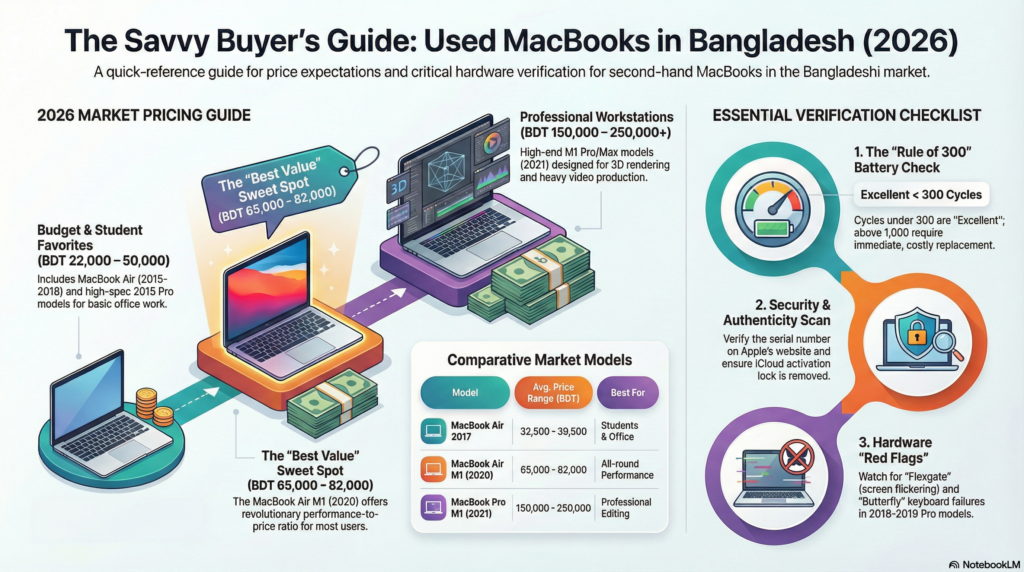
Are you looking to buy a used MacBook in Bangladesh but worried about pricing, authenticity, and where to find the best deals? You’re not alone. With new MacBook prices ranging from BDT 99,000 to over BDT 499,000, many Bangladeshi professionals, students, and creative professionals are turning to the second-hand market for affordable yet powerful Apple laptops.
This comprehensive guide will walk you through everything you need to know about used MacBook price in BD, how to verify authenticity before purchase, and the best platforms to buy second-hand MacBooks safely in 2026.
What is the Average Price Range for Used MacBook Models in Bangladesh?
The used MacBook market in Bangladesh offers significant savings compared to brand-new models. Here’s a detailed breakdown of used MacBook price in BD across different models and years:
MacBook Air Pricing (Most Popular Budget Option)
MacBook Air 2015 13-inch
- Price Range: BDT 22,000 – 29,000
- Specifications: Intel Core i5/i7, 8GB RAM, 128GB/256GB SSD
- Ideal For: Students, basic office work, web browsing
- Current Market Price: BDT 22,000 at Apple Studio BD
MacBook Air 2017 13-inch
- Price Range: BDT 32,500 – 39,500
- Specifications: Intel Core i5/i7, 8GB/16GB RAM, 128GB/256GB SSD
- Battery Life: Up to 12 hours
- Current Market Price: BDT 32,500 at Apple Studio BD
MacBook Air 2018 13-inch
- Price Range: BDT 42,000 – 50,000
- Specifications: Intel Core i5, 8GB RAM, 128GB/256GB SSD, Retina Display
- Notable Features: First MacBook Air with Retina display, Touch ID
- Current Market Price: BDT 42,000 at Apple Studio BD
MacBook Air M1 (2020)
- Price Range: BDT 65,000 – 82,000
- Specifications: Apple M1 chip, 8GB RAM, 256GB SSD
- Performance: Revolutionary performance, 15-18 hours battery life
- Why It’s Worth It: Best value for money, outperforms many newer Intel laptops
MacBook Pro Pricing (Professional Performance)
MacBook Pro 2015 15-inch
- Price Range: BDT 42,000 – 50,000
- Specifications: Intel Core i7, 16GB RAM, 256GB/512GB SSD, Dedicated AMD GPU
- Best For: Video editing, graphic design, programming
- Notable: Last MacBook Pro with multiple ports and user-replaceable battery
- Current Market Price: BDT 42,000 at Apple Studio BD
MacBook Pro 2016-2017 13-inch with Touch Bar
- Price Range: BDT 48,000 – 65,000
- Specifications: Intel Core i5/i7, 8GB/16GB RAM, 256GB/512GB SSD
- Features: Touch Bar, USB-C only design
- Considerations: Check keyboard condition (butterfly keyboard issues)
MacBook Pro 2019-2020 16-inch
- Price Range: BDT 95,000 – 130,000
- Specifications: Intel Core i7/i9, 16GB/32GB RAM, 512GB/1TB SSD
- Best For: Professional video editing, 3D rendering, software development
MacBook Pro M1 (2020) 13-inch
- Price Range: BDT 85,000 – 110,000
- Specifications: Apple M1 chip, 8GB/16GB RAM, 256GB/512GB SSD
- Performance: Exceptional performance, runs cool, 17-20 hours battery life
MacBook Pro M1 Pro/Max (2021) 14-inch/16-inch
- Price Range: BDT 150,000 – 250,000
- Specifications: M1 Pro/M1 Max chip, 16GB-64GB RAM, 512GB-2TB SSD
- Professional Grade: ProMotion display, multiple ports, best for heavy workloads
Price Factors to Consider
The used MacBook price in BD varies based on several factors:
- Model Year: Newer models command higher prices
- Processor Type: M1/M2 chips are more expensive than Intel models
- RAM and Storage: Higher configurations cost more
- Physical Condition: A-grade (like new) vs B-grade (minor scratches)
- Battery Health: Lower cycle counts mean higher prices
- Screen Condition: Retina displays add value
- Warranty Status: Some sellers offer limited warranties
- Market Availability: Rarer models may cost more
General Price Brackets
- Budget Range (Under BDT 30,000): MacBook Air 2013-2015, basic configurations
- Mid-Range (BDT 30,000 – 60,000): MacBook Air 2017-2018, MacBook Pro 2015
- Premium Range (BDT 60,000 – 100,000): MacBook Air M1, MacBook Pro 2017-2019
- Professional Range (Above BDT 100,000): MacBook Pro M1/M1 Pro/Max, recent Intel 16-inch models
How to Check the Condition and Authenticity of a Used MacBook Before Purchase?
Buying a used MacBook requires careful inspection to ensure you’re getting an authentic, fully functional device. Here’s your complete verification checklist:
1. Verify Serial Number and Model Information
How to Check Serial Number:
- Click the Apple logo (top-left corner)
- Select “About This Mac”
- Note the serial number displayed
What to Do with Serial Number:
- Visit Apple’s Check Coverage page
- Enter the serial number to verify:
- The device is genuine Apple product
- Original purchase date
- Warranty status (if any remaining)
- Whether it’s reported stolen
- Exact model specifications
Red Flags:
- Serial number doesn’t match Apple’s database
- Device reported as lost or stolen
- Seller refuses to provide serial number
- Serial number has been tampered with or doesn’t match the one on the box
2. Check Battery Health and Cycle Count
Battery health is crucial when evaluating used MacBook price in BD. A healthy battery can save you BDT 15,000-25,000 in replacement costs.
Method 1: Using System Information (Basic Check)
- Hold Option key and click the Apple logo
- Select “System Information”
- Click “Power” in the left sidebar
- Check these values:
- Cycle Count: Number of full charge cycles completed
- Condition: Should say “Normal” (anything else means replacement needed)
- Full Charge Capacity: Compare with design capacity
Method 2: Using Terminal (Advanced – Detects Fake Batteries)
- Open Terminal (Applications → Utilities → Terminal)
- Copy and paste this command:
ioreg -rn AppleSmartBattery | grep -E '"Manufacturer"|"CycleCount"|"Temperature"|"MaximumCapacity"|"SerialNumber"|"ManufactureDate"'
- Press Enter to see real battery data
Understanding Battery Cycle Counts:
- 0-300 cycles: Excellent condition (like new)
- 301-500 cycles: Good condition (80-90% health)
- 501-800 cycles: Fair condition (70-80% health)
- 801-1000 cycles: Service recommended soon
- Above 1000 cycles: Battery replacement needed
Maximum Cycle Counts by Model:
- MacBook (2008 and later): 1,000 cycles
- MacBook Air (2018 and later): 1,000 cycles
- MacBook Pro (2009 and later): 1,000 cycles
- MacBook Pro (M1 and later): 1,000 cycles
Warning Signs of Fake or Replaced Batteries:
- 2-3 year old MacBook with under 100 cycles (statistically suspicious)
- Manufacturer shows as “Generic” instead of “SMP” or “Simplo”
- Serial number shows “1234567890” or repeating patterns
- Maximum capacity over 100% on an old device
- Temperature reading shows 0°C (impossible)
3. Screen and Display Inspection
What to Check:
- Dead Pixels: Open a white background and black background, look for stuck or dead pixels
- Screen Bleeding: Display a black screen in a dark room, check edges for light leakage
- Retina Coating: Look for delamination (anti-reflective coating peeling off)
- Color Accuracy: Display different colors, check for discoloration
- Brightness: Test maximum brightness levels
- Viewing Angles: Check from different angles for color shift
Red Flags:
- Multiple dead pixels or pixel clusters
- Significant backlight bleeding
- Coating delamination (common in 2013-2017 models)
- Yellow tint or discoloration
- Flickering display
4. Keyboard and Trackpad Testing
Keyboard Tests:
- Test every single key multiple times
- Check for sticky or unresponsive keys
- Verify backlighting works on all keys
- Test special function keys (volume, brightness, etc.)
Butterfly Keyboard Warning (2016-2019 MacBook Pro): These models had notorious keyboard failures. Check if:
- Keys stick or repeat letters
- Keys don’t register presses
- The keyboard has already been replaced (ask for documentation)
Trackpad Tests:
- Click across entire trackpad surface
- Test Force Touch (press hard to feel haptic feedback)
- Try multi-finger gestures (two-finger scroll, pinch to zoom)
- Check for cracks or separation from body
5. Ports and Connectivity Testing
Test All Ports:
- USB-C/Thunderbolt: Test with actual devices and charging
- USB-A (older models): Plug in USB drives
- HDMI/Mini DisplayPort: Connect to external display
- Headphone jack: Test with earphones
- SD card slot: Insert and remove SD card
Wireless Connectivity:
- WiFi: Connect to network, check speed
- Bluetooth: Pair with device (phone, mouse, keyboard)
- AirDrop: Test file transfer if possible
6. Physical Condition Assessment
Exterior Inspection:
- Check for dents, scratches, or cracks
- Examine hinge for looseness or cracks
- Look at corners for impact damage
- Check bottom case screws (if tampered with, device may have been opened)
- Inspect rubber feet for wear
Body Grading System:
- A-Grade: Mint condition, no visible scratches
- B-Grade: Minor scratches, fully functional
- C-Grade: Visible wear, dents, but works properly
- D-Grade: Significant damage, may have functionality issues
7. Performance and Functionality Tests
Run These Tests Before Buying:
CPU and RAM Test:
- Open Activity Monitor (Applications → Utilities)
- Check CPU usage at idle (should be low)
- Verify RAM amount matches specifications
- Open multiple apps to test performance
Storage Test:
- Check storage capacity matches advertisement
- Look for Disk Utility errors
- Test read/write speeds if possible
Sound Test:
- Play audio through speakers (check for distortion)
- Test at maximum volume
- Check microphone with Voice Memos app
- Test headphone jack audio
Camera Test:
- Open Photo Booth or FaceTime
- Check image quality and focus
- Verify LED indicator light works
Temperature Test:
- Run the MacBook for 15-20 minutes
- Feel for excessive heat
- Listen for loud fan noise
- Check if fans work at all
8. Software and Security Checks
Before You Buy:
- Ensure the seller has removed iCloud activation lock
- MacBook should boot to setup assistant (not locked to previous owner)
- Check macOS version and verify it can be updated
- Ask for proof of purchase (original receipt if available)
Firmware Password Check:
- Restart the MacBook
- Hold Option (Alt) key during startup
- If you see a lock icon requiring password, the firmware is locked
- Seller must remove this before purchase
FileVault Status:
- Check if disk encryption is enabled
- Seller should provide password or disable before sale
9. Common MacBook Issues to Watch For
Model-Specific Problems:
MacBook Pro 2016-2019:
- Butterfly keyboard failures
- Flexgate (display cable issue causing stage light effect)
- Touch Bar unresponsiveness
MacBook Pro 2011-2013:
- GPU failure (known issue, leads to crashes)
- Battery swelling
MacBook Air 2018-2019:
- Display coating delamination
- Keyboard issues
10. Documentation to Request from Seller
Must-Have Documents:
- Original purchase receipt (proves ownership)
- Box with matching serial number
- Original charger and cable
- Any remaining warranty documentation
- Proof that iCloud is removed
What to Check Before Buying a Second-Hand Device Running macOS?
Beyond the physical condition, there are several macOS-specific checks you must perform:
Operating System Verification
Check macOS Version:
- Click Apple logo → “About This Mac”
- Note the macOS version
- Verify if it can update to latest macOS
Why This Matters:
- Older Macs may not support latest macOS versions
- Some apps require newer macOS versions
- Security updates are crucial for safety
macOS Compatibility Examples:
- macOS Sonoma (2023): 2018 and later models
- macOS Ventura (2022): 2017 and later models
- macOS Monterey (2021): 2015 and later models
Storage and Memory Assessment
Check Available Storage:
- Click Apple logo → “About This Mac” → “Storage”
- Verify total capacity matches listing
- Check available free space
- Look for suspicious space usage
RAM Verification:
- About This Mac → “Memory” tab
- Confirm RAM amount and type
- Check if RAM is upgradeable (only pre-2016 models)
System Integrity Check
Run Apple Diagnostics:
- Shut down the MacBook
- Power on while holding D key
- Let diagnostic tests run (takes 2-5 minutes)
- Note any error codes or issues reported
Check for Water Damage:
- Look at Liquid Contact Indicators (LCIs) in ports
- Red or pink indicators mean water exposure
- Original silver color means no liquid damage
Application and Software Check
Verify Pre-installed Apps Work:
- Safari: Browse websites
- Mail: Open and check functionality
- Photos: Can import and view images
- iMovie: Opens without crashing (tests GPU)
- GarageBand: Tests audio processing
Third-Party Software:
- Previous owner should have deauthorized all accounts
- iTunes/Music should not be logged in
- iCloud should be signed out
- No parental controls or restrictions active
Network and Security Settings
Reset All Settings (After Purchase):
- System Preferences → “Reset” or “Erase All Content and Settings”
- Reinstall fresh macOS from Recovery Mode
- Set up as new device with your Apple ID
Check for MDM (Mobile Device Management):
- Enterprise-managed Macs may have restrictions
- May appear on login screen or About This Mac
- Ask seller to remove MDM before sale
What are the Best Online Platforms to Buy Second-Hand MacBooks Safely?
Finding a trustworthy seller is just as important as checking the MacBook itself. Here are the most reliable platforms for buying used MacBooks in Bangladesh:
1. Apple Studio BD
Why We Recommend: Apple Studio BD is Bangladesh’s trusted source for pre-owned Apple products with thorough quality checks.
Advantages:
- Professionally refurbished MacBooks
- Quality-checked before listing
- Transparent pricing with specifications listed
- Multiple payment options
- Limited warranty on select products
- Physical showroom for inspection
- After-sales support
Contact Information:
- Phone: +880174 8405669, +88 0173147 5138
- Website: Apple Studio BD
Product Categories:
2. BDStall – Used Laptop Section
Overview: BDStall’s Used Apple Laptop Section connects you with verified sellers across Bangladesh.
Advantages:
- Wide selection of used MacBooks
- Price comparison across multiple sellers
- Verified seller badges
- User reviews and ratings
- Detailed product descriptions
- Filter by price, model, and location
Tips for Buying on BDStall:
- Check seller ratings and reviews carefully
- Prefer sellers with “Verified” badges
- Meet in safe public locations for inspection
- Don’t pay full amount before thorough testing
- Get written receipt with seller details
3. Facebook Marketplace
How to Use Safely: Facebook Marketplace is popular for used MacBook sales in Bangladesh, but requires extra caution.
Advantages:
- Large selection and competitive prices
- Can view seller’s Facebook profile
- Direct communication with seller
- Local meetups possible
- Negotiate prices easily
Safety Tips for Facebook Marketplace:
- Check seller’s profile age and activity
- Look for mutual friends or connections
- Read reviews on seller’s profile
- Always meet in public places (bank, shopping mall)
- Bring a tech-savvy friend for inspection
- Never pay via mobile banking before seeing device
- Be wary of “too good to be true” deals
- Ask for video call to see the MacBook first
Red Flags to Avoid:
- Brand new Facebook accounts with no history
- Sellers who refuse to meet in person
- Prices significantly below market value
- Requests for advance payment
- No clear photos of actual device
- Seller has multiple MacBooks for sale (possible stolen devices)
4. Computer Zone BD
Overview: Computer Zone BD is a reputed importer of refurbished and A-grade used laptops in Bangladesh.
Advantages:
- Imports quality used laptops
- A-grade condition guarantee
- Physical store in Dhaka
- Competitive pricing
- After-sales support
Best For: Buyers who want professionally refurbished devices with some warranty coverage.
5. ReCell Bangladesh
Specialization: ReCell focuses on quality-checked used MacBooks with fair pricing based on condition.
Advantages:
- Hand-checked for quality
- High battery health verification
- Original or certified components
- Transparent condition grading
- Hot deals on budget MacBooks
Best For: Budget-conscious buyers looking for MacBooks under BDT 50,000-80,000.
6. Authorized Dealer Trade-In Programs
How It Works: Some authorized Apple resellers in Bangladesh offer trade-in programs where they sell refurbished devices.
Advantages:
- Highest trust factor
- Genuine Apple parts used in refurbishment
- Official warranty on refurbished devices
- Can trade in your old device
- Expert inspection and restoration
Examples:
- iStore Bangladesh
- Executive Machines Ltd
- Global Brand PLC
Note: These tend to be slightly more expensive but offer the best peace of mind.
7. Bikroy.com
Overview: Bangladesh’s largest classifieds platform has a dedicated laptop section.
Advantages:
- Huge selection (370+ Apple laptops)
- Price range from BDT 3,000 to BDT 100,000
- Filter by location, price, and specifications
- Contact sellers directly
- Some verified sellers
Caution: Similar safety precautions as Facebook Marketplace apply here.
Smart Shopping Tips: Getting the Best Used MacBook Price in BD
Negotiation Strategies
Research Before You Buy:
- Check prices on multiple platforms
- Know the current market rate for your desired model
- Factor in condition when comparing prices
- Consider battery health in your offer
Negotiation Tactics:
- Point out any defects or high cycle counts
- Mention competitor pricing
- Offer cash for immediate purchase discount
- Bundle deals (ask for accessories included)
- Be willing to walk away if price isn’t right
Best Times to Buy:
- After new MacBook launches (prices drop)
- Year-end sales (December-January)
- Mid-year (June-July) when students sell before upgrading
- Eid holidays when people need quick cash
Where to Inspect Before Buying
Safe Meeting Locations:
- Bank premises (safe and has witnesses)
- Large shopping malls with security
- Apple authorized service centers (for professional check – small fee)
- Well-lit public cafes with WiFi (can test internet)
- Office buildings (if seller has legitimate business)
What to Bring:
- A tech-savvy friend or technician
- USB drive to test ports
- External display to test video output
- Power bank or charger to test charging
- Checklist of things to verify
- Cash in safe place
Documentation and Receipt
Must-Have Documentation:
- Written receipt with seller details (name, phone, address, national ID)
- Device details (model, serial number, specifications)
- Purchase price and date
- Condition at time of sale
- Seller signature and your signature
Receipt Template:
USED MACBOOK PURCHASE RECEIPT

Seller Name: _________________
Phone: _________________
Address: _________________
National ID: _________________

Buyer Name: _________________
Phone: _________________

Device Details:
Model: MacBook Pro/Air _____ [Year]
Serial Number: _________________
Specifications: ___GB RAM, ___GB SSD, Processor: _______
Battery Cycle Count: _____
Physical Condition: A/B/C Grade
Accessories Included: _________________

Sale Price: BDT _________________
Date: _________________

Seller Signature: _________     Buyer Signature: _________
Common Mistakes to Avoid When Buying Used MacBooks
1. Not Checking Serial Number
Many buyers skip this crucial step and end up with stolen or blacklisted devices.
2. Ignoring Battery Health
A new battery costs BDT 15,000-25,000. Factor this into your budget if cycle count is high.
3. Buying Without Physical Inspection
Never buy based on photos alone. Always inspect in person.
4. Falling for “Too Good to Be True” Prices
If a 2020 M1 MacBook is priced at BDT 40,000, it’s likely stolen, fake, or has major issues.
5. Not Testing All Functions
Buyers often skip camera, microphone, or speaker tests and regret it later.
6. Paying Full Amount Upfront
Always pay after thorough inspection. Consider using escrow services for online purchases.
7. Ignoring iCloud Lock Status
An iCloud-locked MacBook is useless. Ensure it’s removed before purchase.
8. Not Getting Written Receipt
Without documentation, you have no recourse if something goes wrong.
9. Buying Model Not Compatible with Latest macOS
Check if the MacBook supports current and future macOS versions you’ll need.
10. Not Researching Model-Specific Issues
Some models have known defects. Research before buying that specific model.
Is Buying a Used MacBook Worth It in Bangladesh?
Advantages of Buying Used MacBooks
Significant Cost Savings:
- Save 40-60% compared to new models
- Get higher specifications for your budget
- Access premium features at mid-range prices
Value Retention:
- MacBooks hold value better than other laptops
- Can resell later at reasonable price
- Build quality ensures longevity
Environmental Benefits:
- Reduces electronic waste
- Sustainable choice
- Extends device lifecycle
Proven Performance:
- Used MacBooks still outperform many new Windows laptops
- M1 MacBooks from 2020 rival 2024 Windows laptops
- macOS optimization ensures smooth experience
When to Buy New Instead of Used
Consider Buying New If:
- You need the absolute latest features (M3/M4 chip)
- You want full Apple warranty (1 year)
- Budget allows (above BDT 120,000)
- You need AppleCare+ protection
- You’re risk-averse about pre-owned electronics
- You need the device for critical professional work
Best Value MacBook Models in Bangladesh (2026)
Best Overall Value: MacBook Air M1 (2020)
- Price: BDT 65,000-82,000
- Why: Revolutionary performance, incredible battery, will last 5+ years
Best Budget Option: MacBook Air 2017
- Price: BDT 32,500-39,500
- Why: Affordable, reliable, good for basic tasks
Best for Professionals: MacBook Pro 2015 15-inch
- Price: BDT 42,000-50,000
- Why: Multiple ports, upgradeable, great for video editing
Best for Future-Proofing: MacBook Pro M1 Pro (2021)
- Price: BDT 150,000-200,000
- Why: Exceptional performance, will remain relevant until 2030
Frequently Asked Questions (FAQs)
Q1: What is the cheapest used MacBook available in Bangladesh?
The most affordable used MacBook in Bangladesh is typically the MacBook Air 2013-2015 model, starting from around BDT 18,000-22,000. However, for better performance and longevity, we recommend budgeting at least BDT 30,000-35,000 for a MacBook Air 2017 model.
Q2: How many battery cycles are acceptable for a used MacBook?
For a fair deal:
- Under 300 cycles: Excellent (expect to pay premium)
- 300-500 cycles: Good (normal pricing)
- 500-800 cycles: Fair (ask for discount)
- Above 800 cycles: Negotiate battery replacement cost (BDT 15,000-25,000)
Q3: Is it safe to buy used MacBooks from Facebook Marketplace?
Yes, but with precautions: verify seller profile, meet in public places, thoroughly test the device, check serial number with Apple, get written receipt, and never pay before inspection. Prefer sellers with positive reviews and established profiles.
Q4: Can I upgrade RAM and SSD on used MacBooks?
Only on pre-2016 models:
- MacBook Pro 2012 and earlier: Both RAM and SSD upgradeable
- MacBook Pro 2013-2015: Only SSD upgradeable
- MacBook 2016 and later: No upgrades possible (soldered components)
Q5: What is the difference between refurbished and second-hand MacBooks?
- Second-hand: Sold as-is by previous owner, no professional checks
- Refurbished: Professionally tested, cleaned, repaired if needed, often includes warranty
Refurbished MacBooks cost 10-20% more but offer better reliability.
Q6: Do used MacBooks come with warranty in Bangladesh?
Most private sales don’t include warranty. However:
- Authorized resellers may offer 3-6 month limited warranty
- Check if original Apple warranty is still active (via serial number)
- Some sellers offer 7-15 day return policy
Q7: How long will a used MacBook last?
With proper care:
- M1/M2 MacBooks (2020-present): 6-8 years
- Intel MacBooks (2015-2019): 4-6 years
- Older Intel MacBooks: 2-4 years
Factors affecting lifespan: usage intensity, maintenance, model year, and battery health.
Q8: Can I get used MacBooks with EMI in Bangladesh?
Yes! Some platforms offer EMI options:
- Apple Studio BD: Check with them for EMI plans
- Bank credit cards: Most banks offer installment options
- bKash/Nagad: Some merchants accept installment payments
Q9: What should I do immediately after buying a used MacBook?
- Remove seller’s iCloud and accounts
- Factory reset and reinstall macOS
- Update to latest macOS version
- Run Apple Diagnostics
- Check battery health again
- Install antivirus software
- Set up your Apple ID and accounts
- Create Time Machine backup
Q10: Is AppleCare+ available for used MacBooks?
AppleCare+ must be purchased within 60 days of original purchase. For used MacBooks:
- Not eligible if original purchase date exceeded 60 days
- Can check eligibility on Apple’s website with serial number
- Third-party extended warranties may be available from some resellers
Final Thoughts: Making the Right Used MacBook Purchase in Bangladesh
Buying a used MacBook in Bangladesh can be an excellent investment if you do your homework. With prices ranging from BDT 22,000 for older models to BDT 250,000 for recent high-spec devices, there’s a MacBook for every budget and need.
Key Takeaways:
- Research thoroughly: Know the current used MacBook price in BD for your desired model
- Inspect carefully: Follow our comprehensive checklist for authenticity and condition
- Buy from reputable sources: Prefer established platforms like Apple Studio BD or BDStall
- Verify everything: Serial number, battery health, and physical condition are non-negotiable
- Get documentation: Always obtain written receipt with seller details
- Test extensively: Don’t rush the inspection process
- Stay safe: Meet in public places and bring a knowledgeable friend
Your Next Steps
Ready to buy your used MacBook? Here’s what to do now:
- Set Your Budget: Determine how much you can spend
- Choose Your Model: Based on your needs and the pricing guide above
- Visit Trusted Platforms:
- Apple Studio BD for quality-assured devices
- BDStall Used Apple Section for wider selection
- Facebook Marketplace for best deals (with caution)
- Use Our Checklist: Print or save this guide for reference during inspection
- Negotiate Wisely: Use the condition assessment to negotiate fair pricing
- Make the Purchase: Only after thorough verification
Still Have Questions?
The used MacBook market in Bangladesh is dynamic, with prices and availability changing frequently. Whether you’re a student looking for an affordable MacBook Air for assignments, a creative professional needing a MacBook Pro for design work, or simply someone who appreciates quality Apple products without the premium price tag, buying used is a smart choice.
Remember: A well-maintained used MacBook from 2017 can outperform many brand-new Windows laptops in 2026, thanks to macOS optimization and Apple’s quality build. Don’t let age alone deter you—focus on condition, specifications, and your specific needs.
Happy MacBook hunting! With this comprehensive guide, you’re now equipped to find the perfect used MacBook at the best price in Bangladesh.
Related Articles You Might Find Helpful:
- Where to Find Official Service Centers for Premium Portable Computers in Dhaka?
- MacBook Repair and Maintenance Tips for Bangladeshi Users
- Comparison: MacBook Air vs MacBook Pro – Which is Right for You?
Disclaimer: Prices mentioned in this article are approximate and based on February 2026 market research. Used MacBook prices can vary based on seller, condition, location, and market demand. Always verify current pricing before making a purchase. This article is for informational purposes only and does not constitute professional financial advice.
Last Updated: February 15, 2026
Have you recently purchased a used MacBook in Bangladesh? Share your experience, the price you paid, and which platform you used in the comments below to help other readers make informed decisions!